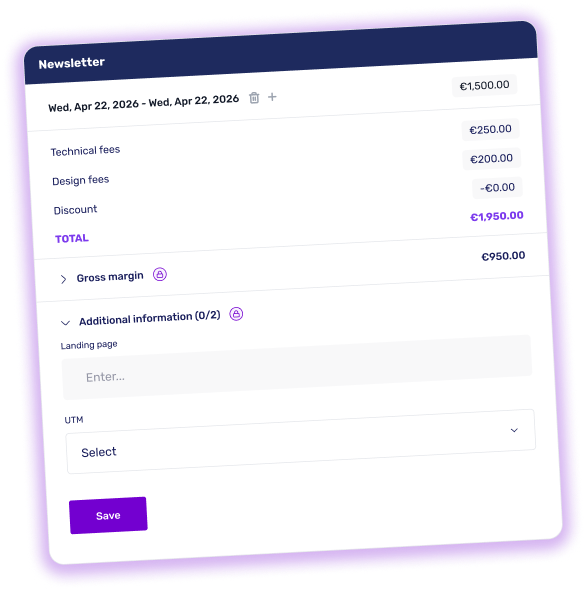
Every media booking comes with information of its own (UTM, tracking URL, external ID, internal note...). Duyo now gives it a dedicated home.
A new Additional information section appears on every media booking. It holds the media custom fields configured in your account Settings, each in the format that suits it: text field, single select or multi-select. Every booking keeps its own values, independently of the others.
This information is strictly internal. The padlock next to the title makes it clear: it never appears on the brand interface, in any context. So you're free to record whatever your organization needs.
These custom fields are also available in Duyo exports, both manual and automatic. They are added to the Media section of the file, following the existing columns, with one column per active attribute.
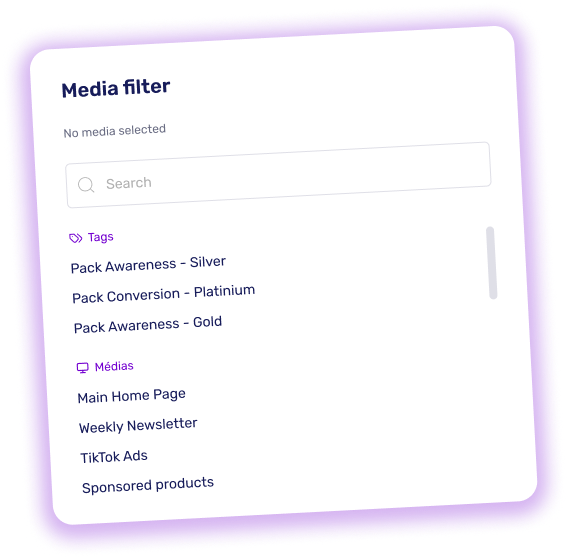
Selling several media together as a bundled offer? Duyo now lets you bring them all up in a single selection when you book.
Here's how it works: group your media under a shared tag, then pull them all up at once when booking. A new Tags section now sits above the media list in the search. Select your pack's tag and the list narrows straight down to the media it contains. No more identifying and adding them one by one.
Searching by media name works exactly as before: the search field looks across both sections at once, so you can take whichever route gets you there fastest.
Want to go further? Combine several tags to bring multiple packs into a single list, or clear a filter to return to your full media catalog.
Duyo now lets you monitor the gross margin on your media, from the media page to the dashboard, through every booking. All of this in a strictly internal space, brands never have access.
The media creation and editing page is now organized into two clearly separated blocks. The first, Pricing, groups everything billed and visible to the brand: price, specific prices, additional fees. The second, Media Cost, introduces a new field (the default cost) representing what the media actually costs you. This amount is strictly confidential and never appears on any surface accessible to the brand.
As soon as a period is selected, a Gross margin block appears below the billed total, on the booking popup as well as on the reserved media card. Expand it to see the cost, margin and margin rate. The cost is pre-filled from the media's default value, but you can adjust it at booking if needed: the calculation updates in real time.
The Media ranking widget gains a new Margin column displaying, for each media, the margin in euros and the margin rate as a percentage over the selected period. This data is recalculated daily through an automated process.
Until now, advancing a campaign to Proposal status (or beyond) required at least one brand contact to have activated their account. During rollout phases, when brand contacts haven't yet been responsive, this prerequisite could stall your campaign progress.
This constraint is now lifted: as long as a contact exists for the brand, you can move the campaign status forward, even if that contact hasn't activated their account yet. Only cases where no contact at all is associated with the brand remain blocked.